NOTE: To purchase Apple products on our web store, you must be a current MCC student, faculty, or staff member.
Summer Financial Aid is May 18th - July 3rd
Summer Bookstore Hours
Brighton
Monday - Thursday 8:30am - 4:30pm
Friday 8:30am - 1pm
Downtown
Monday - Thursday 9am - 1pm
Friday Closed
June 19th - Closed for Juneteenth
June 25th - 30th Closed for Inventory
July 3rd - Closed Independence Day Observed
Congratulations
Class of 2026
Please enter search criteria.
D2L Access Instructions
To gain access to your course materials, follow these steps:.
- Log into Brightspace at https://mymcc.monroecc.edu and then click on the Brightspace tile.
- Navigate to your course by clicking on the course tile or clicking on the course selector and finding your course in the drop down menu.
-
Faculty will set up courses in various ways. Click on any course resource link (it may be labeled as Ebook or with an activity name). You may see it labeled with “External Learning Tool”.

- Follow the prompts, and click “Purchase”
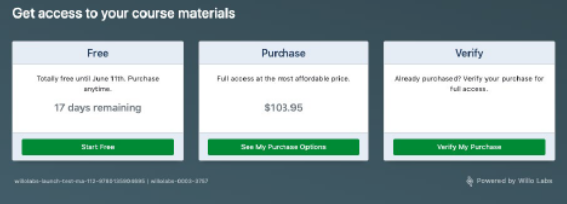
- You will be directed to the MCC Bookstore website to complete your purchase.
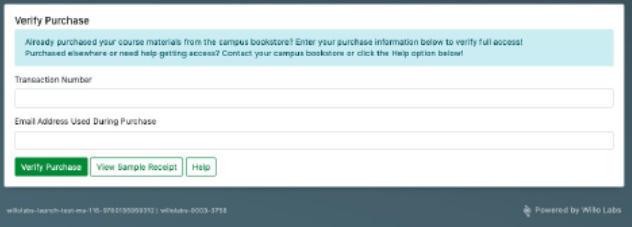
- Once you have purchased and have an Order Number, you will go back to the course information and “verify my purchase.”
- Enter your order number and the email address you ordered to redeem access.

-
MCC Bookstore - Brighton
1000 East Henrietta Road
Rochester, NY 14623
(585) 292-2020
MCC Bookstore - Downtown
321 State St.
Rochester, NY 14623
(585) 685-6006
Brighton
Monday -Thursday
8:30AM - 4:30PM
Friday
8:30AM - 4:00PM
Downtown
Monday – Thursday 9:00 am to 1:30 pm
Friday Closed